O send out thy light and thy truth: let them lead me; let them bring me unto thy holy hill, and to thy tabernacles. Psalms 43:3

And as all have not faith, seek ye diligently and teach one another words of wisdom; yea, seek ye out of the best books words of wisdom; seek learning, even by study and also by faith. D&C 88:118

The kids

The kids

Wednesday, March 5, 2014

Emergency Preparedness?

What would you do in a natural disaster? Would your children know what to do if there was an earthquake? How would you cook? What would you do if there were no water? My family is about to find out. We are going to be doing a natural disaster simulation. We will be going without power, water, and gas for 24 hours. Since it is only a simulation, we are leaving our refrigerator and freezer powered so we don’t lose food, and we won’t be turning the gas off at the source- just not using the gas fireplace, stove, or furnace.

Some of my kids are dreading this and others are really excited.  Those that are dreading it are only dreading that they don’t know when it will happen and they are hoping that nothing fun/important is impacted.

Originally, we set about to do this because it is Tiger’s midterm, but now, we are doing it for ourselves. B went through and created a realistic scenario (parents were provided some scenarios but none were super realistic or necessarily applicable to our area) and put together the plan. Now I will need to execute it.

See you in 24 hours- hopefully I will have some decent pictures. Smile

Tuesday, March 4, 2014

Motivated Moms App- Schoolhouse Review

Motivated Moms Review

A couple of months ago, I saw the chore and task planning app Motivated Moms iOS App (with full year server access) from Motivated Moms and thought it looked awesome. I even downloaded the trial version and really liked it, but the two week trial was really too short for me to know if I would use it and I didn’t get a chance to upgrade. Then I was offered a chance to review the App for the Schoolhouse Review Crew and I jumped at the chance! The Motivated Moms iOS App costs $1.99 and comes with two months of server access. In-App purchase allows additional server access for $.99 each month or $7.99/year. It is also available for Android. Now for just a couple of dollars it is easy to try the app for two months and then upgrade if desired.

Motivated Moms Review

Over the years I have tried various methods to break down all the tasks I need to accomplish into bite sized pieces with varying degrees of success. Often I can get the daily stuff taken care of, but those pesky once a year or worse three times a year things just don’t usually get done on a regular schedule. Enter Motivated Moms App! This app breaks down all the daily things, household management and tidying, and includes those couple of times a year items so they will get done regularly, and daily Bible reading assignments (which can be turned off like all other tasks if desired). In addition to breaking down common household tasks, Motivated Moms allows for unlimited task additions. I used this feature extensively to help myself remember to sit down and spend time prepping for co-op or to go to the store.

Within the app, there is the ability to view only the tasks for “Today,” “Daily”",” and “All” tasks. I used this feature frequently. On days were I was not going to be home much, I would click Daily and just do the bare minimum. On days where I had more time, I would do All and on busy at home days I would do just the list for Today (plus a couple of things from Daily so I could check them off). There is something about opening the app and clicking done on Make Bed first thing in the morning! I am starting to understand why some people add things to their lists that they are doing anyway just so they can check them off and feel successful! The items on the list can be sorted by A to Z, room, person, or user sorted. The user sorted allows me to order my tasks in order of importance. I love this feature. (The user sort screen does need a little streamlining to enable quicker task editing and returning to the check list screen. I think they are trying because during the review period, I updated the app and it was a little different navigating, improved in some ways but made worse in others.) As tasks are finished, a checkmark appears and then the item drops to the bottom of the list.

Did I already mention that I love that the app reminds me to do the infrequent things I often forget? During the review period, it reminded me to change my furnace filter. I had been meaning to do it but kept forgetting- for the past year. I opened up the Motivated Moms App and there it was: change filter on furnace. I asked B to do it since it is way up high behind several screws and a piece of sheet metal and poof, task completed and long overdue furnace filter changed! I also like that if I don’t get to something, it will be back. This was especially nice when I had a really busy week getting ready for the co-op play and just didn’t have time to do some of the daily tasks daily. I also like that I can change the due date on an occurrence of an item. That item will then move to another date. It won’t affect the other other occurrences of the task in the future, just the single occurrence. I often did this on Fridays because I am not home most of the day. I would then change the due date of the most important tasks so they would still get remembered.

A feature that I need to utilize more is the ability to color or “assign” tasks to others. Initially I thought this was only useful if I was sharing the app across devices and “assigning” for my kids, but, by using colors, I can keep myself accountable when I give and instruction for a task to be completed. When I go through my checklist I can see that it isn’t completed yet or has been completed by that child. 

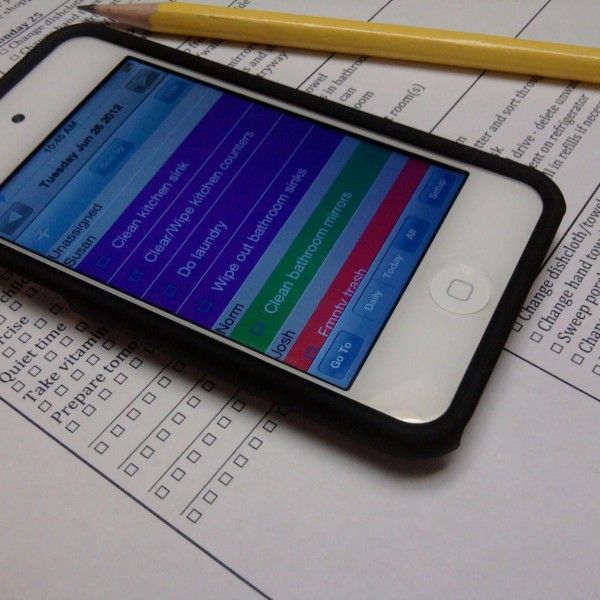
I had a really long list of things to do and most got checked off.  Here is a screenshot of some of it. Since Tiger is responsible for dishes,I did color that one green. photo

While I didn’t use this feature, an important feature to note is the ability to sync across devices. This would be especially helpful if multiple family members utilized iOS devices and you wanted to assign tasks to various people. They could then “check back” by checking off their tasks. Another feature I did not use was email/print daily task list. For some that would be helpful, but for the way I was using the list, it wouldn’t have helped me. I do think it is a valuable feature that could be very useful for some people. In the future, I might print it out on Saturdays to help coordinate the family to the family work.

I wish I could edit some of the pre-programmed tasks. For example, I do not have a microwave, but I do have a toaster that needs to be cleaned. Yes, I could just think in my mind that I need to clean the toaster oven when “microwave” pops up, but I would prefer to see toaster oven so my list feels more mine. I would also love to be able to change the occurrence of a preset task. For example, “Water Houseplants” pops up on Saturday. I have 1 houseplant- an orchid- that needs to be watered on Wednesdays. Yes, I can just check off that it is done on the wrong days or change the due date on that one occurrence, but I would rather edit it and be done. The workaround is to hide the task and then make my own. When I contacted the developer to ask about editing pre-programmed tasks, I was told that they are working on developing a way to edit the preprogrammed tasks as well as a search function so you can find tasks within the program (Maybe you want to know when the next time you should change your furnace filter is). While neither of those features are available, now, I think they will make the app more user friendly and even more useful.

I really like the Motivated Moms App. I think it has a bit of a learning curve, especially if a home is cluttered, but over time, I have gotten more and more in the habit of using it and I love it. After I submit this review, I will be checking off that box next to Submit Motivated Moms Review in my app. One more check towards a successful day! It might be called the Motivated Moms App, but it can be used by anyone who needs some structure to their daily tasks.

Click to read Crew Reviews
Be sure to check out the other reviews. The crew also got to review the printable planners.
Crew Disclaimer

Wednesday, February 26, 2014

Birthday Party

I don’t do young child birthday parties. I just can’t handle them. However, as my kids have gotten older, I have allowed them to hold their own birthday party. I figured once they were old enough to plan and execute their own party and I wouldn’t have to be super involved in it/entertain the kids the whole time, I could do it. As they get older, I think it is good for them to have some friends over, so it works for me. As as result, I told them 10 years old.

Butterfly was so excited to plan her own birthday. She planned it for MONTHS. She had lists, pages, agendas, schedules, friend lists, mock invitations, etc. Originally she planned “10 friends with 10 activities for her 10th birthday!” I had to limit the number of friends and advise her that scheduling 10 minutes of day dreaming probably wasn’t going to happen at her party given her list of friends. Some of them would have happily engaged in day dreaming, but the rest probably wouldn’t have. In the end, she settled on a tea party and making shrinky dink jewelry with all the girls in her co-op classes. What really happened was a tea party, fort building outside, and shrinky dink jewelry. Butterfly planned the decorations, wore her favorite dress, made tea sandwiches, and asked for spiced apple cider to pour out of the teapot she made. I also cut up fruit for the party- pineapple, strawberries, and apples.

It was so funny to listen to the girls having their tea party. They giggled and plotted. One sweet girl kept reminding the others that they were “ladies” and should practice their best manners since this was a tea party. Another little girl told them that since they were just kids they should just have fun.

 IMG_1003IMG_1000 - CopyIMG_1004

After tea, the girls decided they wanted to play outside. During their tea, they dreamed up the game they would play, “Yard Kids.” Everyone created their own persona. Apparently Yard Kids is a game of house except all the kids don’t have parents and they live outside… The game actually started before the tea party when Butterfly, Pumpkin Pie, and a friend were playing together outside on a different day, but then it expanded to the whole group.

The yard kids went to work building a fort. IMG_1008IMG_1009

Eventually, they got cold and came inside. Then, despite the fact that there was only half an hour left of the party, they decided it was time to delve into the shrinky dinks. Moms arrived and the girls were still hard at work. Butterfly had a grand time and I think her friends did too.

Tuesday, February 25, 2014

Snow Day

Last week we had a snow day! We really haven’t had much snow this year, even the little bit we got didn’t stick around long. The big kids ran off to play leaving B and I with Strawberry and Little One. We bundled up Little One, put on a pair of snow boots that are tad too big for him, and headed out. February 2014_0050Unlike the rest of my kids, Little One enjoyed poking his fingers in the snow and even didn’t mind trying to walk. I remember both Pumpkin Pie and Strawberry at about 15-18 months and they hated the snow and clunky boots. They just sat and fussed after about a minute. Little One laughed. After struggling to stand up a few times, he took off and didn’t care that the snow was slippery and hard to walk in and his boots were too big and stiff.February 2014_0045February 2014_0047February 2014_0048February 2014_0071February 2014_0065

Strawberry enjoyed making lots of snow angels.February 2014_0058February 2014_0060 February 2014_0064February 2014_0059

As we walked home from our walk, the big kids were staging for a snowball attack… B was ready for them though.

 February 2014_0054February 2014_0053

Monday, February 24, 2014

KinderBach- Schoolhouse Review

Kinderbach Review

With two older sisters learning to play piano and a brother who also plays, Strawberry has been clamoring for piano lessons of her own. I was offered the chance to review The KinderBach Online Piano Lesson Membership with Teacher Corner from KinderBach. KinderBach online membership is intended for children ages 3-7 and costs $95.88 per year at the time of this review. Normally it costs $130 per year. A membership to the KinderBach online program includes 6 levels of video lessons, each with 10 weeks of 4 lessons each (about 240 lessons), appropriate workbooks, and the teacher corner. KinderBach videos are viewable on many different platforms. I only used it on my PC but according to the website, the videos associated with the online membership are also viewable on iPad, Android Tablets, Kindle Fire, and Nook. The lessons are taught by the KinderBach founder Karri Gregor. 

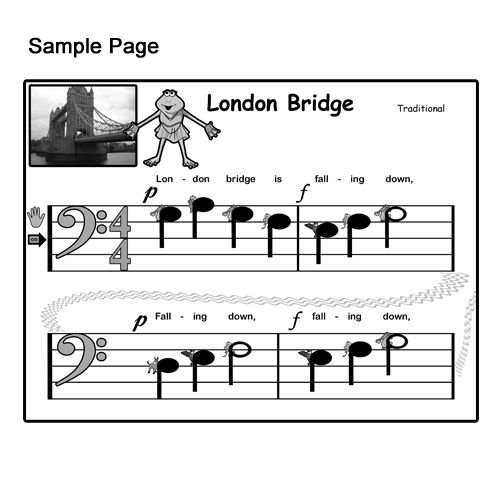
KinderBach teaches six areas of music ear listening skills, note reading, rhythm, hand position, singing, and composition with incremental and age appropriate music, pictures, and stories. Ear listening exercises include activities like discerning high or low pitch as well as loud and quiet and recognizing and duplicating rhythms. Note reading includes recognizing patterns, simple chord symbols, notes on a staff, and knowing the letter names of the keys on the keyboard. Note reading progresses from reading pictures on a set of stairs to reading notes on a staff. Initially, KinderBach uses the Piano Pals for note reading. The “Piano Pals” are cute characters to help a young pianist learn where the notes are on the piano and get to know the keyboard more fluently. Eventually, these characters make way for actual notes. Rhythm lessons includes recognizing the beat value as well as how to count the beat and time signatures. Hand position lessons includes numbering fingers, left and right hands, and proper hand position. Singing helps with learning to play by ear and is also included in some of the lessons. During the time of the review, Strawberry experienced all areas of music except the composition area. Each of the lessons include activities like coloring, singing, clapping, dancing, and playing the keyboard.

The Teacher Corner allows a parent to download all materials for a class easier. Included are manuals, worksheets and workbook pdfs, and other resources. In order to utilize KinderBach, it is essential to have at least a keyboard with regular sized keys, rhythm instruments of some kind (but this could be a plastic cup and a spoon), glue, scissors, crayons, paper, cardstock and a printer.

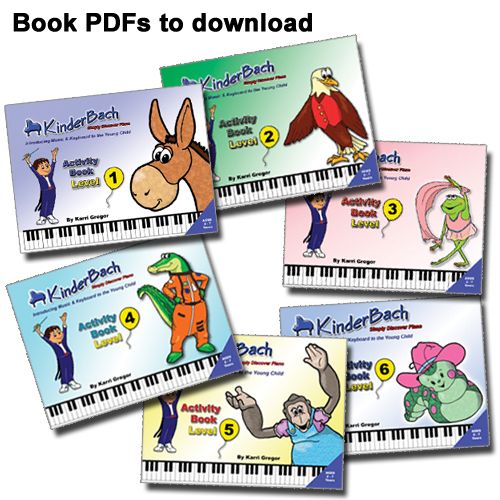
The Teacher Corner is not something I really used. It is primarily geared to those who want to teach KinderBach to more than one student. Some of the resources includes a Lesson Plan Book (about 25 pages), Teacher Aid Book (color pictures and charts to print and use in your lessons), Teacher Guide, Audio MP3 files, Student book, goal book, and certificate. Not every resource is available for all levels, and nothing is yet available for Level 6, but they are being added. There are also some resources available for Level 7, although there are no videos for level 7 in the lessons. Additionally, there are coloring pages, music, and story books available to download and use. The coloring books and storybooks include the stories about the piano pals and excerpts from lessons. The music will allow a child to play music right away, even before he or she knows how to read music.

Overall I really like KinderBach. I like that lessons are really short- usually under 5 minutes. This is perfect for a preschooler. It also allows them to repeat a lesson several times without taking too much time. I like that all of the lessons are engaging and hands on. The music and songs encourage involvement and most of them didn’t grate on my nerves the way some preschool music does.

The first day I opened KinderBach, Strawberry asked to do several lessons in a row. Some of them multiple times. Every day she asks for her piano lessons.When B comes home, she proudly shows off her coloring pages and tells her dad what she has learned.

Each time we did a lesson, we clicked on the appropriate lesson and Strawberry participated. In the following picture, she was practicing discerning high and low pitch with her body. When the music was high pitch, she stood high. When it was low pitch, she crouched low. Frisco, the character seen in the picture also danced to the music to help the child see what to do. IMG_0961IMG_0959

I love that each lesson has both the associated worksheet with the lesson as well as what the lesson purpose is listed underneath the video. This helped me to know what materials would be needed as well as to get the right pages printed even though I didn’t print every single page. Alternatively, the entire lesson book is available to print from the Level screen if you desire to print the entire book and bind it.  Since I found that it was not necessary to print every single worksheet, I preferred the option to print from the lesson.  Kinderbach Review
Kinderbach Review

The attention to details is fabulous. Each week has an intro where all the materials for the coming week are noted as well as what will be covered. Then there are four lessons during the week. One great example of the attention to detail was found in an exercise where the children were distinguishing loud and quiet sounds. There was one bubble left in quiet and none in loud. The host pointed out that she could still do something loud and then the child would need to draw a bubble in the loud side. I loved that since it helps to keep kids engaged and not just assuming the right answer.

I also like that when the kids are asked to do something, KinderBach gives ample time before revealing the answer. Strawberry felt like the teacher was really talking to her and would answer the teacher’s questions during the lessons. I also like that many of the materials needed are common. For example, when rhythm instruments are needed, it can be as simple as two sticks or pencils or in the picture below, a new unsharpened pencil and Strawberry’s hand. The teacher in the video used a milk jug and stick to make music in addition to more traditional rhythm instruments.

February 2014_0119

The biggest con I found was that initially the videos are small and sometimes when they are blown up to full screen they are a little blurry. This isn’t true for all of the videos, but for quite a few it is. I also would have liked to have an easier way to remember where we were in the lessons. The lesson area does not keep track of progress at all.

The first two weeks of lessons are available for free to try. We have really enjoyed KinderBach and will continue to use it for music practice. I am really grateful that we were given this opportunity and give this product a thumbs up!  

Click to read Crew Reviews
Or here for all the reviews. 
Crew Disclaimer
 

Saturday, February 22, 2014

White Belt with a Gold Stripe

Strawberry had her first Little Dragons Test a few weeks ago. It is fun teaching her class and being her Sensei. I love getting to present belts to my family, but this is the first time I got to have a picture of the new belt with sensei and be the sensei in the picture!

February 2014_0084February 2014_0079February 2014_0027February 2014_0031

Thursday, February 20, 2014

Glorious Homeschool Day

One of the things I want my children to experience is theater. On Tuesday I took the kids to see Pinocchio. It was a new take on the show- we arrived and the set looked like a painters workshop. Knowing the theater we were in, I was a bit surprised to see such an off set. I had expected a woodworker’s shop! The premise was a bunch of painters telling the audience who won’t leave the story of Pinocchio. The use whatever painter materials they have on hand to tell the store. It was so well done. It was especially fun because our play last week had the children playing children playing other characters. I thought I had a picture of the set but maybe I only thought about taking the picture and never got around to it. Anyway, we went with some friends. So fun.

February 2014_0137

Then, one family joined us on an expedition to the spice store. We started out by riding the monorail. It was raining and really cold. Even though there was a roof over us, all the kids were gathering under the umbrella.


February 2014_0142February 2014_0144February 2014_0147

Once we got to the other end of the route, we ran down several blocks in the rain to the spice store. Then we ran back to the monorail. The kids loved it, even the running in the rain. Butterfly was kind enough to share the inside jacket with her brother who forgot his jacket at home.

Then, we went to the Science Center.

February 2014_0151

Tiger took Little One to play in the tot area for a little bit and then ran off to explore other areas himself. Meanwhile, Pumpkin Pie and Butterfly explored the tide pools and learned all about the animals that they were touching. The docent was fabulous. February 2014_0158February 2014_0157

Little One’s walking abilities meant he wasn’t content to hang out in the carrier. He wanted to play too! Thankfully there is a little tots area. He loved the water table. Silly boy hates baths but likes splashing in puddles.  February 2014_0160He also had fun climbing on the play structure.  Finally a place where he could climb without being taken down or stopped. February 2014_0163February 2014_0165

After we got home, B helped Strawberry and Pumpkin Pie sort the spices and sort our jars.

February 2014_0174

Know we would be gone all day, Tiger took his books he was reading for class in the car with us and did almost all his readings on the way to the theater and back. Way to use your time Tiger!